Text and ideas / PRACTICAL GUIDE
ChatGPT: check discount rules at threshold amounts
Exactly 1000.00 qualifies, delivery is excluded from the discount base, and a half kopeck in the discount tests rounding. We work through seven short cases.

Even a tidy table needs a calculation you can check
The customer adds 1200 rubles' worth of items to the basket but gets no discount. Is that an error? Not necessarily: only 900 rubles' worth may qualify for the promotion. Another trap lies right at the threshold: 'from 1000' can easily become 'more than 1000'. ChatGPT can help prepare test cases for tasks like this, provided it does not have to guess the rules.
We will work through a practice shop rule and seven sets of inputs, producing a small decision table for a product manager or tester. The amounts and conditions below were invented for this walkthrough; they are not a live promotion. The model's answer will need to be checked against a separate calculation.
Define the base, threshold and rounding step
First separate the items covered by the promotion from the other items and delivery. One 'basket total' field is not enough here. Let A be the eligible item subtotal before the discount, B the other item subtotal, and D the delivery charge. All input amounts are non-negative and have two decimal places.
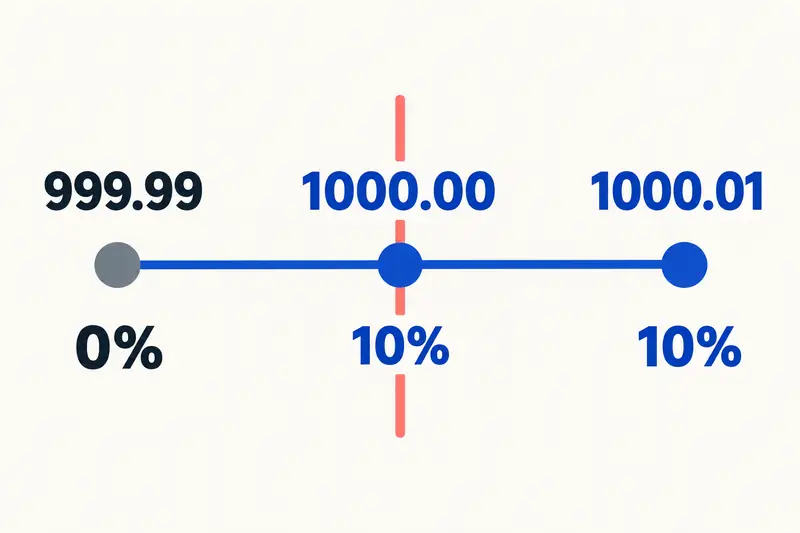
In this example, the discount is 10% of A when A is at least 1000.00. B and D neither bring the order closer to the threshold nor receive a discount. Round the total discount once to two decimal places, rounding an exact half kopeck up. Then calculate the total: A - discount + B + D. This rounding rule was chosen for the example; use the approved rule for your own system.
The original description also says: 'The discount cannot be combined with a coupon.' This prohibits using both, but does not decide which one to keep. The example does not specify the coupon parameters either. Until the coupon priority, value and conditions of use are clear, this case has no single total. Do not ask the model to invent that part of the policy.
EXAMPLE PROMPT
PRACTICE CONDITIONS
A - eligible items before the discount; B - other items; D - delivery. Amounts are non-negative, with no more than two decimal places.
If A >= 1000.00, discount = A * 0.10; otherwise 0. B and D do not count toward the threshold.
Round the discount once to two decimal places; round an exact half kopeck up. Total = A - discount + B + D.
The discount cannot be combined with a coupon; the coupon priority, value and conditions are not specified.
Ask for boundary cases, not random amounts
OpenAI's official documentation recommends supplying the relevant context, specifying the output format and explicitly identifying missing information. Here that means including the full rule, separating the input fields, and requesting a verifiable formula, substituted values and total. Simply asking to 'check the discount' defines neither the discount base nor what 'from' means.
Send the conditions from the previous block with the request below. K1, K2 and K3 differ by one kopeck around the threshold. K4 checks whether unrelated amounts have been included in the discount base. K5 keeps the same extra charges, with the threshold now met. K6 tests the half-kopeck case; K7 tests unresolved priority. These are cases selected in advance, not fabricated ChatGPT responses.
EXAMPLE PROMPT
Using the practice conditions above, create a table: case | basis for the discount | discount before rounding | rounded discount | formula with substituted values | total | question. Do not add rules. For the case with an active coupon and unclear priority, do not choose an option or give a single total; ask for the coupon priority, value and conditions. Use a decimal point to separate rubles from kopecks.

K1: A=999.99, B=0, D=0, no coupon.
K2: A=1000.00, B=0, D=0, no coupon.
K3: A=1000.01, B=0, D=0, no coupon.
K4: A=900.00, B=300.00, D=200.00, no coupon.
K5: A=1000.00, B=300.00, D=200.00, no coupon.
K6: A=1000.05, B=0, D=0, no coupon.
K7: A=1000.00, B=0, D=0, coupon active.
Calculate the reference values separately
Do not ask the same model to certify its own table and treat that as an independent check. The values below were calculated from the stated rule. Check them by hand, with a decimal-arithmetic calculator, or in a spreadsheet with explicit rounding settings. Both the formula and the reason for applying the discount matter.
K1: A is below 1000.00, so the discount is 0 and the total is 999.99. K2: the threshold itself qualifies, so the discount is 100.00 and the total is 900.00. K3: the discount is 100.001 before rounding and 100.00 after rounding; the total is 900.01.
K4: the discount is 0 and the total is 900.00 + 300.00 + 200.00 = 1400.00. The overall amount exceeds the threshold, but A remains 900.00. K5: the discount is 100.00 and the total is 1000.00 - 100.00 + 300.00 + 200.00 = 1400.00. Matching totals do not make K4 and K5 the same case: their eligibility and payment components differ.
K6: 1000.05 * 0.10 = 100.005. Under our rule, the discount rounds to 100.01 and the total is 900.04. The value 900.05 points to a different calculation, such as rounding the discount down to 100.00. Check that intermediate amount before changing the entire prompt.
K7: the question remains open. You need to know who chooses between the coupon and the discount, which rule governs that choice, and the coupon's value and conditions of use. Writing 'total 900.00' without that decision would silently add to the conditions.
Correct the specific discrepancy
If K2 has no discount, check the comparison operator. If K4 has a discount, the model used the overall total instead of A. If only K6 differs, check rounding first. This pinpoints the part of the request that needs clarification; a general instruction to 'be more careful' does not identify the error.
For a numerical correction, asking for the formula and substituted values is enough. You do not need a long account of how the model arrived at its answer. After the correction, check all seven rows: asking it to preserve everything else does not guarantee the other values will stay unchanged.
EXAMPLE PROMPT
Correct only K6 using the original rule. The discount base is A=1000.05 and the rate is 10%. Show the product before rounding, the rounded discount, and the total. Round an exact half kopeck up; round only once, on the total discount. Do not change the conditions or choose the coupon rule in K7 on behalf of the owner. Then list the identifiers of the other rows that remain unchanged.
Add the conditions your own system uses
The practice rule does not cover returns, multiple currencies or discounts on individual line items. If your system has those conditions, add them from the approved specification and create separate cases for each. Do not expand the task into an arbitrary list of every possible promotion: first establish which rule you are checking.
Take particular care when implementing the calculation in code or a spreadsheet. Different rounding functions and binary representations of fractions can behave differently at exact halfway values. Check the specific tool's settings against the chosen rule, and keep K6 as a separate test. Restating the formula in text does not prove that the implementation calculates it the same way.
Hand over the table with the unresolved question
Keep the original conditions, input fields, reference values and a separate coupon question for the developer. The six fully specified cases can serve as a starting set of tests. The seventh needs a priority decision and the coupon parameters if the coupon is chosen; only then can an expected result be recorded.
When the threshold, discount base or rounding changes, recalculate the reference values before asking again. ChatGPT helps organize the analysis and spot contradictions, but the reference must remain separate from its answer. That lets you distinguish a changed rule from a new arithmetic error.